
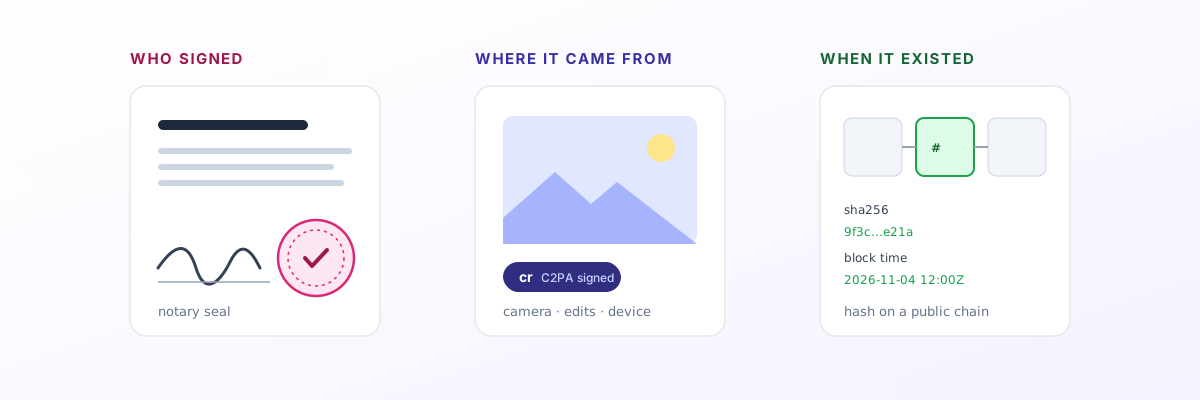
“Can you prove this is the original?” sounds like one question. In practice it’s at least three:
- Who signed it? A contract, an affidavit or a power of attorney needs to show that a specific, identified person agreed to it.
- Where did it come from? A news photo or eyewitness video needs to show which device captured it and whether it was edited since.
- When did it exist? A manuscript, a design, a dataset or a piece of code needs to show that this exact version existed by a certain date.
Three different tools answer those three questions: a notary, Content Credentials (C2PA) and a timestamp. People often reach for the wrong one, because the names sound alike and the marketing overlaps. This guide explains what each really proves, where each one breaks, and how to choose.
1. A notary proves who signed
A notary public is a licensed official who checks a person’s identity and watches them sign. The seal says, in effect: this person, whose ID I checked, signed this document in front of me on this date. That is why property deeds, affidavits and many legal forms require one.
Notarization has moved online. With remote online notarization (RON) the signer meets a commissioned notary over live video, proves their identity and signs electronically. Proof, the company behind Notarize and one of the largest providers, says 42 US states had effective RON laws by late 2025, with three more passed and not yet in force (Proof). Its consumer price is US$25 for the first notary seal and US$15 for each additional one (Notarize).
What it doesn’t prove: a notary vouches for the signer, not the content. The seal doesn’t say the facts in the document are true, and a notary won’t help with a file nobody signs, such as a photo, a draft chapter or a spreadsheet. It also depends on the notary’s records and the provider staying in business.
Use it when the law or the other party requires a notarized signature. Nothing else on this list replaces it.
2. Content Credentials prove where a file came from
Content Credentials are the consumer name for C2PA, an open standard backed by Adobe, Google, Microsoft, camera makers and news organisations. A device or app that supports it attaches a manifest to the file: a set of statements (“assertions”) about where it came from, such as the capture device, the edits made and a thumbnail. Those statements are gathered into a claim, and, in the specification’s words, “the claim is then cryptographically hashed and signed” (C2PA specification). Change the image and the signature no longer matches.
Support is growing but still narrow. The Google Pixel 10 signs every photo by default, and users report that Pixel 8 and 9 gained it through updates in 2026. Samsung’s Galaxy S25 adds credentials only to images edited with generative AI, not to ordinary photos. A handful of professional cameras from Leica, Sony, Canon and Fujifilm sign at capture (c2paviewer device list). Most phones in use today, including nearly all budget Android phones, can’t do it at all.
Where it breaks:
- It lives inside the file. Social platforms often strip the manifest when they compress or re-encode uploads. Fewer than 1% of news images and videos carry C2PA data, according to the Reuters Institute (SoftwareSeni summary). The specification has a fallback for this, matching a stripped copy back to a stored manifest by fingerprint or watermark, but it relies on that store existing.
- Most cameras lack a trusted timestamp. The capture time comes from the device clock, which weakens the record for forensic use (same source).
- Signing keys can fail. Nikon’s Z6 III signing was suspended and its certificates revoked in September 2025 after a vulnerability (c2paviewer).
Use it when you can capture on a supported device and the question is “is this photo or video what it claims to be?” It’s the best tool for capture-time provenance. It just doesn’t survive the journey across the internet on its own.
3. A timestamp proves when a file existed
A timestamp answers the narrowest question: did this exact file exist by a certain moment? It doesn’t need to see the file. It works on a hash, usually SHA-256: a 64-character fingerprint calculated from the file’s bytes. Change one byte and the fingerprint changes completely, and nobody can work backwards from the fingerprint to the file. So you can prove that a confidential file existed without revealing it.
There are two ways to fix that fingerprint in time.
Trusted timestamp authorities
A timestamp authority signs the hash together with the current time, using a standard protocol from 2001, RFC 3161 (RFC 3161). In the European Union, a qualified electronic timestamp from a certified provider carries a legal presumption: under the eIDAS regulation it “shall enjoy the presumption of the accuracy of the date and the time it indicates and the integrity of the data to which the date and time are bound” (eIDAS, Article 41). The same article says an ordinary electronic timestamp can’t be refused as evidence just because it is electronic. Like a notary, though, the proof is only as durable as the authority and its certificates.
Blockchain anchoring
The other approach writes the hash into a public blockchain. Once a block is confirmed, nobody, including the service that wrote it, can change or back-date it, and anyone can check it without trusting that service. OpenTimestamps, a free open-source project, does this on Bitcoin and puts it simply: “A timestamp proves that some data existed prior to some point in time” (OpenTimestamps).
Courts have started to accept this kind of record. In 2018 the Hangzhou Internet Court in China accepted a blockchain-preserved copy of a web page as evidence in a copyright case, after checking that the record was reliable and unaltered, and stressed it would judge such evidence case by case (Rouse). Vermont’s evidence law makes blockchain records self-authenticating when accompanied by a sworn declaration, and presumes the recorded time is when the record was added to the chain, while adding that this “does not extend to the truthfulness, validity, or legal status of the contents” (12 V.S.A. § 1913).
What a timestamp doesn’t prove: who made the file, who owns it, or that nobody had it earlier. It proves existence by a date, nothing more. And it only matches byte-for-byte identical copies: re-save, compress or crop the file and the fingerprint no longer matches, so you must keep the original.
Side by side
| Notary (incl. online) | Content Credentials (C2PA) | Trusted timestamp authority | Blockchain timestamp | |
|---|---|---|---|---|
| Answers | Who signed | Which device, what edits | When it existed | When it existed |
| Works on | Signed documents | Photos, video, audio from supported devices | Any file (by hash) | Any file (by hash) |
| Reveals the content? | Notary sees it | Travels with the file | No, only the hash | No, only the hash |
| Survives re-uploads? | Not applicable | Often stripped | Separate from the file | Separate from the file |
| Who must you trust? | Notary and provider | Device maker’s signing keys | The authority | Nobody: anyone can check the chain |
| Legal standing | Strong, widely required | Emerging | Strong in the EU when qualified | Recognised in some places, case by case |
| Typical cost | About US$25 a seal | Free if your device supports it | Varies by provider | Free (OpenTimestamps) to about US$5 a month |
Which do you need?
- A deed, affidavit or power of attorney: a notary. Nothing else is a substitute when the law asks for one.
- News footage or eyewitness video: capture with Content Credentials if your device supports it, then timestamp the original file straight away, so its existence is fixed even after the credentials are stripped from reposted copies.
- A manuscript, thesis or dataset before submission: a timestamp. It records that version without sending the content to anyone. My earlier post on manuscript timestamping for journals covers how journals can do this.
- A design, logo or code you’re about to show a client: a timestamp, so “I had this first” is evidence instead of an argument.
- A contract in the EU where the date really matters legally: a qualified timestamp from a certified provider, alongside the signatures.
The strongest records combine them. A news organisation might capture with C2PA, timestamp the original immediately, and keep a notarized affidavit from the person who filmed it. Each layer covers what the others can’t.
A note on the tool I built
I run Doc Notary, which does the blockchain-timestamp part: it records a file’s SHA-256 fingerprint on a public chain and lets anyone verify a copy in their browser, free and without an account. For sensitive material there’s a fingerprint-only option, where the file never leaves your device. It’s in beta on the Ethereum Sepolia test network, and, like every tool in this section, it proves existence by a date, not authorship. If you want the open-source, do-it-yourself route, OpenTimestamps is free and well established. For step-by-step instructions on both, see how to timestamp a document and how to check if a file has been changed.
Whatever you use, match the tool to the question. A notary can’t tell you when a photo was taken, a camera signature disappears when the file is reposted, and a timestamp can’t tell you who made something. Knowing which question you’re answering is most of the work.
This article explains how these tools work. It isn’t legal advice; check what your court, client or jurisdiction actually accepts.