
In late August I applied for a Web3 job on Upwork. Full-stack, Solidity, React, wallet integration, thirty dollars an hour. It matched my profile closely, which is exactly why it worked.
Five weeks later I found a keylogger running on my Mac, disguised as an Apple service, starting itself every time I logged in. This post is the full timeline, the evidence I found, and the things I would do differently. I am writing it because the pattern is common, it targets exactly the kind of developer I am, and nothing about it looked dangerous while it was happening.
The job
The client replied quickly. They described a DeFi platform with liquidity pools, staking and farming, and a DEX, and asked me to review their “MVP v1” before we discussed the contract. Reviewing an existing codebase before quoting is a normal request, so I agreed.
Looking back, the warning signs were there, they just did not look like warning signs one at a time:
- The client’s identity changed three times during the conversation. The project and account name shifted between three different organisation names.
- The first repository link did not work. It returned “repository not found”.
- The replacement link pointed to a repository created that same day, with a single commit. It was presented as an existing MVP. A real project that has reached version one has history.
Running it
I cloned the repository and ran it locally. I was careful in the ways I thought mattered: I did not connect a crypto wallet, I did not grant administrator access, and I did not enter any passwords.
The app started at localhost:3000. It was a polished front end for something called UltraX, a “decentralized perpetual exchange”. The client asked me to send a screenshot of it running, so I did.
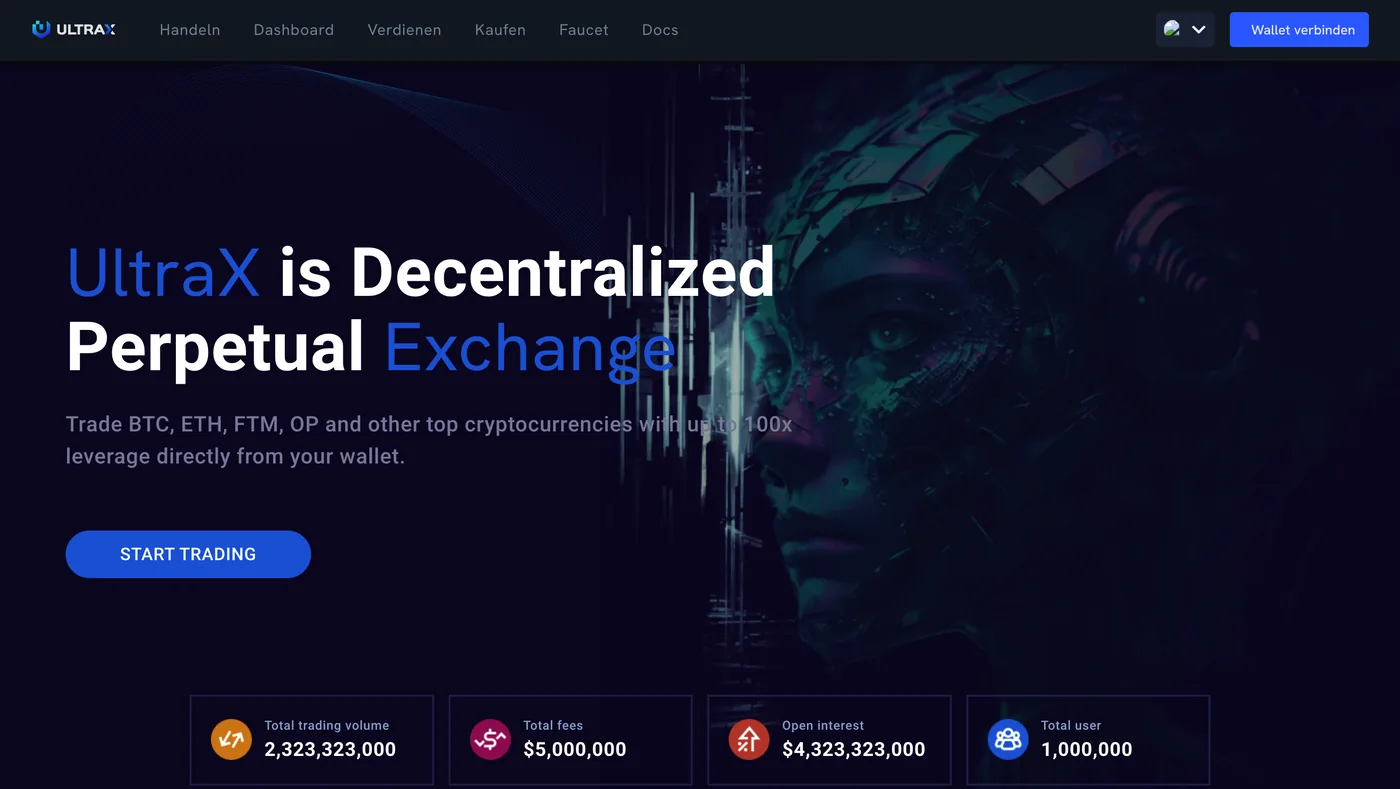
The screenshot I sent the “client”, taken at 7:20 PM on 28 August, one minute after the malware installed itself. Browser bar cropped for privacy; the app was running at localhost:3000.
That request is the detail I now think about most. A genuine client reviewing your work does not need proof that the app launched on your machine. An attacker does, because it confirms the payload executed.
The screenshot is timestamped 7:20 PM on 28 August. The malware installed itself at 7:19 PM.
What the code actually was
When I went through the Solidity contracts, they were not what I would expect from a funded DeFi project:
Blank.solandBabyBlank.solwere standard OpenZeppelin ERC-20 tokens.Migrations.solwas Truffle boilerplate.Bank.sol, the staking contract, had real bugs.claimReward()accepted an amount supplied by the caller with no validation, so anyone could withdraw arbitrary rewards. Deposits were sent toaddress(0), burning them. A publictransferToken()function worked as an unrestricted faucet.
The structure, two ERC-20 tokens and a “Bank” staking contract on Truffle, closely resembles a common public staking tutorial. The front end had its own tells: its statistics were obvious filler, such as 2,323,323,000 in trading volume and exactly 1,000,000 users. The interface labels were in German (“Handeln”, “Verdienen”, “Wallet verbinden”) on a project pitched to me in English. And it was a perpetual futures exchange, not the liquidity pool platform the client had described.
None of the contracts were malicious. That turned out to be the point. The Solidity files were the decoy. In campaigns like this, the harmful code typically lives on the JavaScript side of the project and runs when you install dependencies or start the app. I was reading the part of the repository that was safe, and running the part that was not.
A month of silence
Nothing happened. No pop-ups, no slowdown, no strange behaviour. I moved on to other work.
On 28 September, Upwork emailed me: “we believe another Upwork user may have shared malware with you.” It named the client and recommended a virus scan, a password change, and two-step verification. The account had been suspended.
I deleted the repository, changed my Upwork password, and enabled two-step verification. That felt like the end of it. It was not, for a reason I only understood later.
Finding it
When I finally checked my Mac, I started with the folder where per-user startup programs live:
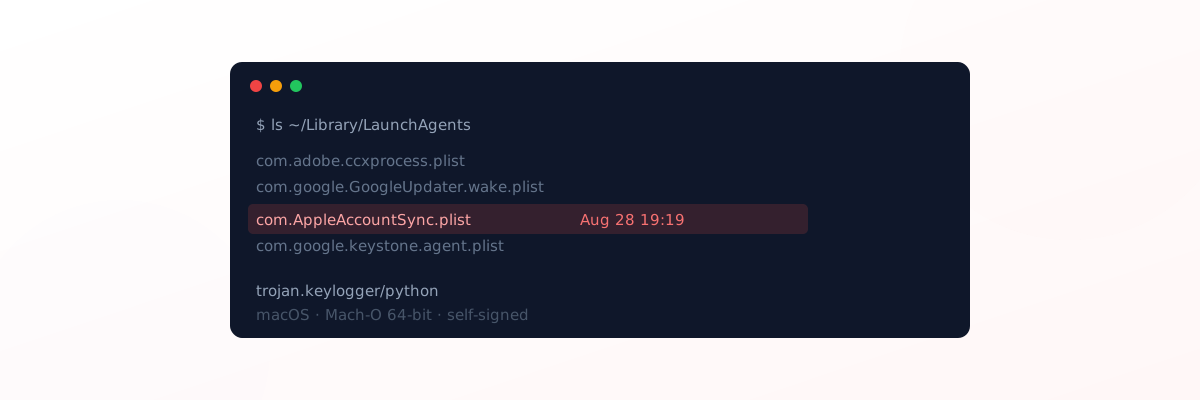
ls -la ~/Library/LaunchAgentsAlongside entries from Adobe and Google, there was one called com.AppleAccountSync.plist, dated 28 August at 7:19 PM. Apple does not install its own services in this personal folder; its system services live elsewhere. A name that sounds like Apple is a way to blend in.
The file told macOS to launch a program every time I logged in:
<key>ProgramArguments</key>
<array>
  <string>~/Library/Application Support/AppleAccountSync/AppleAccountSync.app/Contents/MacOS/AppleAccountSync</string>
</array>
<key>WorkingDirectory</key>
<string>~/.vs_cache</string>
<key>RunAtLoad</key>
<true/>
<key>StandardOutPath</key>
<string>/dev/null</string>
Every detail is designed to be overlooked. A fake Apple app tucked inside Application Support. A working folder named .vs_cache, made to look like a VS Code cache, which VS Code does not normally create. RunAtLoad so it starts on every login. All output sent to /dev/null so it leaves no trace in logs.
Searching my home folder for files created between 27 and 30 August turned up one more: a hidden ~/.zsh_sessions folder containing another AppleAccountSync directory. My terminal uses bash, not zsh, so that folder should not have existed at all. Inside it was a 12.5 MB executable, written on 3 September at 1:58 AM, six days after the infection and in the middle of the night. That looks like a second, larger stage downloaded from the attacker, which means the malware had a working connection out.
What VirusTotal said
I uploaded the 12.5 MB file to VirusTotal. One engine out of 63 flagged it: ESET identified it as Python/Spy.KeyLogger.EXU Trojan, a 64-bit macOS executable, self-signed rather than notarised by Apple. The popular threat label was trojan.keylogger/python.
One in 63 sounds reassuring. It is not. The “last analysed” date showed I was very likely the first person to submit this exact file, which means most vendors had never seen it. New builds of the same malware are common, and detection usually catches up over the following days.
For anyone who wants to check their own machine, the SHA-256 is:
f9875fb5764fc2dbb6a4652977fb079f44a0047018240d7a693743d1923cb8d4What a keylogger means in practice
A keylogger records what you type. It ran on my Mac from 28 August to 6 October. So I have to assume that every password I typed in that window was captured.
That includes the new Upwork password I set on 28 September, after Upwork’s warning. I changed it on the infected machine, while the keylogger was still running. The security step I took in response to the warning was recorded by the thing I was being warned about.
My earlier caution helped less than I thought. Not connecting a wallet, not granting admin rights, and not typing passwords during the review were all sensible. But malware of this kind does not need you to type anything while it installs. It waits, and it reads what you type afterwards.
This is a known pattern
What happened to me closely matches campaigns that security researchers have documented in detail. Microsoft describes one, which it calls Contagious Interview, in which attackers pose as recruiters from cryptocurrency or AI companies and deliver malware through fake coding assessments. The job descriptions target the skills I list on this site: React, Next.js, Solidity, blockchain.
I cannot say for certain that my case belongs to that specific campaign. What I can say is that every element matched: a Web3 role, a polished but hollow project, a request to run it locally, and malware that was quiet, persistent, and built to steal credentials.
What I have done, and what I am doing
Done:
- Removed the startup entry, the fake app, and both hidden folders, and confirmed nothing was still running.
- Submitted the file to VirusTotal, so security vendors can start detecting it.
- Reported the account to Upwork with the file hash, the repository addresses, and the timeline.
- Changed my email, Upwork and GitHub passwords after removing the malware, email first since it can reset everything else, and replaced my GitHub access token. I made these changes on the Mac itself, so I will change them once more after the reinstall.
In progress:
- Revoking old SSH keys and regenerating the API keys for the services I deploy to.
- Erasing and reinstalling macOS. After a month of a keylogger that could fetch new stages, a manual clean-up is not something I am willing to trust.
What I would do differently
Never run a client’s code on your main machine. If you need to evaluate a repository, read it on GitHub or GitLab first, and if you must run it, use a throwaway virtual machine or a cloud environment with no saved passwords, wallets, or keys.
Treat a request for a screenshot of the running app as a red flag. It confirms execution, not quality.
Check the repository’s history. An “MVP v1” with one commit, created today, is not an MVP.
Watch for shifting identities. One name for the job post, another for the project, a third for the repository.
If you are warned, change passwords from a different device. If the warning is about malware on your computer, that computer is the last place to type a new password.
Look at your LaunchAgents folder. On a Mac, ls -la ~/Library/LaunchAgents takes a second, and an Apple-sounding entry you do not recognise is worth investigating.
I build and write about Web3 applications, and I was targeted precisely because of it. The attack did not rely on a clever exploit. It relied on a request that sounded reasonable, from someone who sounded like a client, at the moment I wanted the work.